
GUIDE · CLICK
Click practice for kids
Teach the first click in three steps: land, press, release.
Clicking is the basic mouse skill, and it is just “press once.” But for a first-timer, common sticking points are pressing too hard, holding too long, and moving the mouse while pressing. This guide covers how to teach the very first click.
Why clicking is hard
It is over in an instant for an adult, but a child has to do three things together:
- Put the pointer on top of the thing to press, such as a button.
- Press the button with the index finger, and let go.
- Keep the mouse still while pressing.
If any one of these slips, the click does not land. It is not because your child is clumsy, but because it is a combination of movements.
Teach “press and release”
A click is two movements, press and release, making one click. Say the words out loud and do it together.
- Land: Put the pointer on the thing you want to press (“right here”).
- Press: Press the button with the index finger, with a light “pop.”
- Release: Let go right away (“pop!”).
Saying a light “pop” out loud helps get across the rhythm of “press, then let go.” At first, aiming at something big and easy to see makes success more likely.
Make the left button easy to find
An ordinary click uses the left button of the mouse. Pressing the right button can bring up a menu, which can be a surprise. One idea is to stick a small sticker on the left button as a marker: “press here.”
- Rest only the index finger on the button, and support the mouse with the other fingers and the palm.
- Don’t grip hard. Just rest the hand lightly.
When it still isn’t working
- Pressing too hard: Try “softly, pop.” When force goes into the press, the mouse can move.
- Holding too long: Say “press, then let go right away.” A long hold can count as a different action.
- Moving while pressing: Say “the mouse is sleeping, only the finger goes pop,” so the hand that moves and the finger that presses are thought of separately.
- Missing the target: Slowing down the pointer speed in the computer’s settings makes aiming easier. → How to teach a child to use a mouse
Practice with a game
In Hajimari Garden’s click game, children click once in the meadow to drop food. Friends run over to eat it, and grow a little.
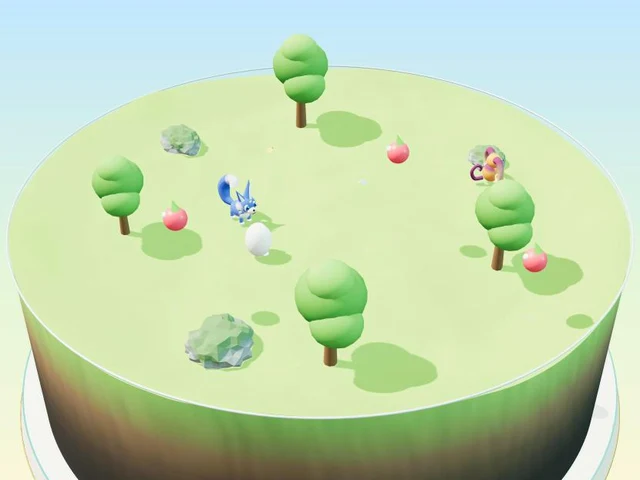
- At the first level, just click anywhere. Food drops wherever you click.
- At the next level, choose a food (berries, carrots or dumplings) and then click. If it is a friend’s favorite, you hear “Yummy, my favorite!”
- The last level is the garden. Click the soil to plant a seed, click the sprout to water it, and click when it is ripe to harvest. Each click has a new purpose.
- A hand on the screen shows what to do at first. Mistakes never count as failing.
Free · No download · No sign-up · No ads on the game screen
FAQ
How many times should we practice clicking?
There is no set number. A few times is plenty at first. Stopping on “I want to do more” makes your child want to play again.
My child keeps pressing the right button.
One idea is to put a small sticker on the left button as a marker, and check together: “we press here.”
I clicked, but nothing happened.
The pointer may be a little off the target. Put the pointer in the middle of something big, then click. If it could be mixed up with a double-click, see the double-click guide too.