
GUIDE · DOUBLE-CLICK
Double-click practice for kids
The click-click rhythm, keeping the hand still, and a computer setting that makes it easier.
Double-clicking is one of the mouse skills children find hardest. The two most common reasons are that the second click comes too late, and that the mouse moves between the two clicks. Teaching the rhythm and adjusting one computer setting often makes it much easier.
Why double-clicking is hard
A double-click is two presses, in the same spot, close together. Easy for adults, but a child has to do three things at once:
- Make the gap before the second press short.
- Keep the mouse still while pressing.
- Watch where the pointer is while pressing with a finger.
If any one of these slips, the computer does not count it as a double-click. It is not that your child is clumsy. It is simply three things combined.
Teach the click-click rhythm
- Say “click, click” out loud and press together. A steady rhythm matters more than speed.
- A slow “click … click” is fine at first. Shorten the gap little by little.
- Practice on big, easy-to-see targets, like large buttons or icons.
Keeping the hand still
- Rest the hand gently on the mouse. No tight grip. Only the pointer finger moves.
- Keep the wrist still during the two presses. Try saying “the mouse is sleeping, only the finger goes click, click.”
- Resting your hand lightly on top of your child’s can help them feel what “still” is.
Slow down the double-click speed
Menu names can differ a little depending on your version.
Windows 11
- Press the Windows key and I together to open Settings.
- Open “Bluetooth & devices,” then “Mouse.”
- Near the bottom, choose “Additional mouse settings.” The classic Mouse Properties window opens.
- On the “Buttons” tab, move the “Double-click speed” slider toward “Slow.”
- You can test it by double-clicking the folder icon next to the slider.
Mac
- Open the Apple menu, then “System Settings.”
- Choose “Accessibility” in the sidebar.
- Open “Pointer Control.”
- Move the double-click speed slider toward the slow side.
If the slider is at the fastest end, two clicks may count as two separate clicks. If double-clicking never seems to work, check this speed.
Chromebooks and tablets
On Chromebooks and tablets, you may not find a setting for the double-click gap. In that case, getting used to it slowly through a game is a good way to go.
Practice with a game
In Hajimari Garden’s double-click game, children click a big egg in the meadow twice, quickly, to hatch it. There is always just one egg to click, marked with a white ring.
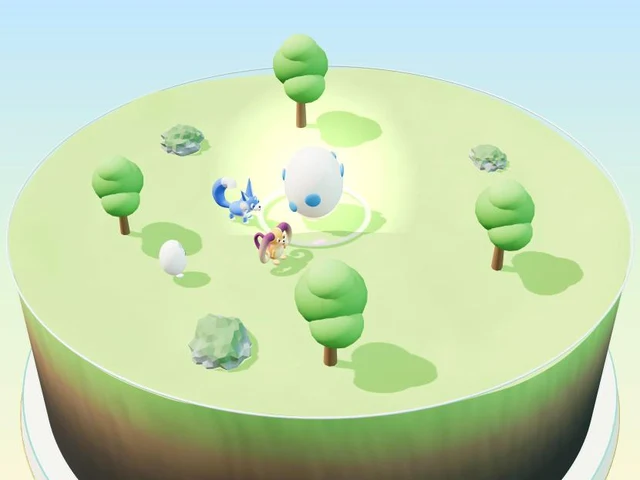
- The first click cracks the egg, and the ring starts to shrink. Click again before the ring disappears, and a baby friend hatches.
- At first, the second click can come within about 1.5 seconds. At higher levels, it gets shorter: about 1.15 seconds, then about 0.9 seconds.
- If the second click is too late, the egg simply goes back to how it was. It never counts as failing.
- A hand on the screen shows what to do, so children can start without reading.
- There is also a pond game where children double-click buds to make them bloom (under “More games”).
Free · No download · No sign-up · No ads on the game screen
FAQ
What if my child still can’t double-click?
First, set the double-click speed toward “Slow.” If it is still hard, it is fine to move on without double-clicking for now. What matters most is not scolding, and keeping it fun.
At what age can children double-click?
Every child is different, and we cannot give a firm age. Hajimari Garden is designed with ages 5–7 in mind, but anyone who is new to computers can play.
Is double-clicking easier with a mouse or a trackpad?
Each has its pros and cons. The “How to” button in the game shows short animations of how to do it on a mouse and on a trackpad. Try whichever your child finds easier.